
Scriptorium: Scraping Entire Documentation Sites and Document Archives to Markdown
Scriptorium saves a documentation website to your own disk as Markdown, one file per page. It’s a command-line tool packaged as a skill for Claude Code and Codex. The actual converting is done by Microsoft’s MarkItDown. Scriptorium adds the parts MarkItDown doesn’t try to do: it finds the pages through the sitemap, puts each one in a folder tree shaped like the site, repairs the links between them and strips the menus and footers. Then it tells you what it did, and the numbers in that report have to balance. It also converts local documents, PDF, Word, PowerPoint and Excel, and a whole ZIP archive of them in one go. It’s free under the MIT license: github.com/valcheffnet/scriptorium.
I work with monitoring products, and their documentation runs to thousands of pages. I wanted it on my own disk for two reasons. I can search all of it at once instead of one browser tab at a time. And I can give it to an AI assistant, which then answers from the documentation instead of from memory. A model’s memory of a product is usually a few versions old and wrong on exactly the details you’re asking about.
The name comes from the room in a monastery where texts were copied by hand, one page at a time. That’s the whole design brief: an accurate copy of somebody else’s work, for your own reading.
Why I wrote it
It started as a workflow I put together to copy the Dynatrace documentation, about 4,400 pages. It did the job, but it was written for that one site and couldn’t be pointed at any other. It also lost content without telling me, and I found out piece by piece over several weeks.
| What went wrong | What it cost |
|---|---|
| Filenames taken from the last part of the URL | 534 of 4,389 pages silently overwrote each other |
| Icons deleted based on image width | 1,453 table cells emptied on a single page |
| Heading ids dropped during conversion | 46% of 8,992 links to a section pointed at nothing |
| Underscores in prose escaped by the converter | 57,068 identifiers written as CUSTOM\_DEVICE, which a search for CUSTOM_DEVICE will never find |
Inline data: images truncated | every such image on a page reduced to the same 24-character string |
Every page converted and no error appeared. Each problem turned up by accident, long after I had trusted the output and built on it.

The underscore one is my favorite, because it isn’t a bug in anyone’s code. MarkItDown uses a library called markdownify, and markdownify escapes _ and * in normal text by default, so they don’t turn into italics. In reference documentation most identifiers are written in plain text, without backticks. The page looks fine. The search returns nothing.
A converter that drops a table still reports success. That’s the problem Scriptorium is built around.
A report that has to add up
Every run prints a coverage equation, and it has to balance:
images = transcribed | skipped | queued | deleted
pages  = converted | failed
Anything deleted is listed with its URL and the reason. This rule came from a bad afternoon. An earlier version counted an image nobody had looked at the same way as one that was deliberately skipped. In one afternoon I got three different progress numbers for the same work, 762, 596 and 561. The real number was 497.
So the tool keeps those two facts apart. “Nobody looked at this image” and “somebody looked and decided it was decoration” go in different columns.
How it works
Five stages. Only the fourth one needs a model.
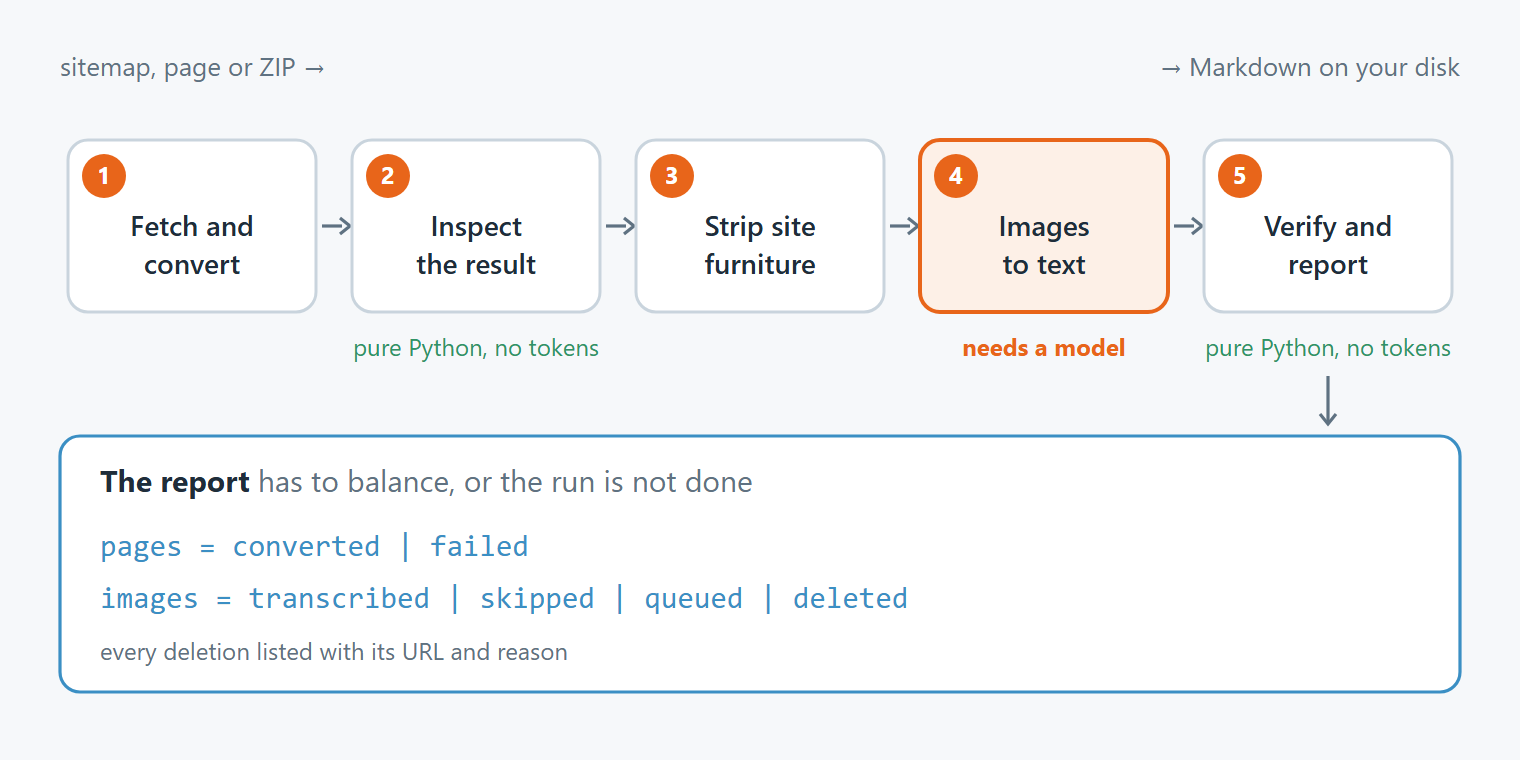
- Fetch and convert. It follows the sitemap and plans every output path before the first download, so a filename collision is caught in the plan and not discovered later as a missing page. Every file starts with the URL it came from.
- Inspect the result. It looks for broken characters and compares the output size with the page size. Three kilobytes of text from a 700 KB page usually means the site renders in the browser and you got the menu.
- Strip the site furniture. Navigation, cookie banners, breadcrumbs, footers and the little permalink icons next to headings.
- Turn images into text. A diagram becomes an ASCII drawing plus a Mermaid diagram, a screenshot of code or a config becomes a code block or a table, and decoration is skipped with a written reason. This is the stage that costs model calls, so deciding which images are worth it matters more than the transcription.
- Verify and report. It reads the files on disk instead of trusting what the earlier stages say they did.
The work from stage 4 is marked in the file with a comment that carries the image’s URL. If you fix a rule and convert the page again, the transcriptions you already paid for stay.
Install and first run
You need Python 3.11 or newer. It also works on 3.14.
git clone https://github.com/valcheffnet/scriptorium.git
cd scriptorium
python -m venv .venv
.venv/bin/pip install -r scripts/requirements.txt
.venv/bin/python -m scriptorium doctor
On Windows the pip line is .venv\Scripts\pip install -r scripts\requirements.txt.
Install through the requirements file, not with pip install markitdown[all]. On Python 3.14 that command finds nothing to install and stops. The worse case is plain pip install markitdown with no extras: it succeeds, and PDF and Office support is missing until the first time you need it. doctor checks for exactly that, along with the Python version and the User-Agent it will send.
The virtual environment takes about 420 MB. For what the tool does, that’s a lot, and most of it is MarkItDown’s dependencies.
To see the output before pointing it at anything big, convert a small public site. It takes about twenty seconds:
python -m scriptorium --profile mkdocs convert https://www.mkdocs.org/sitemap.xml -o ./try
python -m scriptorium verify ./try
Then open a few of the files. Always start with a pilot (--limit 3) and read what comes out. The rules for stripping menus are tuned from what you see there, and tuning them after a full run means converting everything twice.
One trap from Windows. Git Bash rewrites an argument that starts with a slash, like --strip-prefix /docs, into a Windows path before Python sees it. The run finishes with exit code zero and does none of the stripping. Scriptorium now refuses a prefix that looks like a Windows path, but the habit is the point. After a run, check what it actually did.
Use it as a skill
The repository is also a skill: SKILL.md sits at its root, in the open skill format that Claude Code and Codex both read. Clone it straight into the folder where your agent looks for skills, and the agent can run the whole procedure for you, including a folder full of documents.
For Claude Code, in your home folder, so it works in every project:
git clone https://github.com/valcheffnet/scriptorium.git ~/.claude/skills/scriptoriumFor Codex the place is ~/.agents/skills/:
git clone https://github.com/valcheffnet/scriptorium.git ~/.agents/skills/scriptoriumThen set up the Python environment inside that folder, the same way as above. The skill tells the agent how to use the tool, and the tool does the work.
On somebody else’s server
The defaults assume the site isn’t yours. It reads and follows robots.txt, including Crawl-delay. It waits a second between requests to the same host and backs off when the server says it’s busy. The User-Agent says what the tool is. It only pretends to be a browser if you pass --as-browser, which is meant for your own sites.
It also shows you what the site says about AI use. A robots.txt with no ban can still declare that its content isn’t for AI training. A missing ban isn’t consent, so the tool reports that instead of stepping over it.
The output is a local copy of material somebody else wrote. Every file keeps its source URL. There’s nothing in the tool for putting someone else’s documentation back on the public web, and that’s on purpose.
What isn’t done yet
Scriptorium is that workflow rewritten to work on any site, with every one of those failures turned into a check or a test. The workflow behind it has copied the full Dynatrace documentation. The rewritten code itself has so far converted sites of up to 108 pages end to end. It comes with 32 offline tests that run in about a second, and five site profiles: generic, MkDocs, MkDocs Material, Docusaurus and Sphinx.
It doesn’t download images for you; it gives you the list of the ones worth transcribing. It doesn’t crawl sites without a sitemap yet, because calendars and search pages generate endless URLs, and a crawler without clear stop rules walks straight into them.
I’ve only run it on Windows 11. If you run the tests on macOS or Linux, I’d like to know the result, whether they pass or not.
What I learned
The code can be rewritten in a day. The list of ways HTML-to-Markdown conversion loses content took weeks of real failures to put together. It’s in references/traps.md, each one with how to spot it and what to do about it. If you already have a converted documentation set, read that file before you decide it’s fine.
My rule from all this: when a tool says it succeeded, open the file.